This is a collection of my own extensions for the Mac app PopClip. It gives you a popup when you select text, a la iOS, and lets you perform various operations on/with it.
Many of my extensions are Markdown-related, but there are a few other goodies in there, too.
Installation
To install from the download package, just unzip and double-click the extensions you want to use. To install from the source code, just make sure the extension of a folder is .popclipext and double click it in Finder.
If an extension is already installed, double clicking the downloaded one will just update the existing extension. There’s no need to uninstall before moving on to the latest fun.
Many of these extensions have alternate behaviors when
holding modifier keys. Recent versions of PopClip override
these variations and provide specific actions when holding
modifiers, such as Shift to copy result and Option to
display the result in the bar. This means that the
variations in the plugins no longer function. A better
system may be available in the future, but for now, to
restore the modifier key functionality, you need to
disable the global interpretation of them. Open Terminal
and run this command:
The extensions currently included in the bundle. Some are
available elsewhere as well, but this collection will always
be the most up-to-date versions.
Blockquote
Turn indented text (or any text) into nested Markdown blockquotes.
Clicking adds a “>” for each indentation level in the selected text
Command-click to decrease quote level
Command-Option-click key to remove all quoting
When adding quote levels, multiple line breaks between lines creates separate block quotes (by design). If there’s a single blank line between to paragraphs, they’ll be joined together as paragraphs within a blockquote. More than one starts a new quote.
CheckURLs
PopClip extension to show a popup preview for each URL in selected text. Used for confirming the output of scripts like SearchLink without switching to the browser.
Links are shown sequentially in the order they’re found.
Code
Turn selected text into Markdown inline code or a code block. This extension “toggles,” so if the selection already contains code syntax (inline code or fenced code block) the syntax is removed.
Detects whether there are multiple lines:
if not, it surrounds the input with single backticks
if so, it wraps the block in triple backticks (fenced)
When creating an inline code block, it will also detect whitespace at the beginning and end of the selection and make sure that it’s excluded from the surrounding backticks.
Comment
Turn selected text into an HTML or code comment.
Choose a style from the submenu:
<!–: <!-- block of text -->
/*: /* block of text */
#: # before each line
//: // before each line
CopyPLUS
PopClip extension to append the selection to the current contents in the clipboard. This is a duplicate of an existing extension (Append) with just slightly better UTF-8 handling, and modifier key handling for copying with and without linebreaks and whitespace.
Hold Command (⌘) when clicking to add an extra line break between entries.
Hold Option (⌥) to append with no extra whitespace.
CopyURLS
PopClip extension to copy just the URLs in the selection, one per line.
Duplicate of OpenURLS, but copies URLs to the clipboard instead of opening them in a browser.
Option: join lines first to repair URLs broken across line breaks
CriticMarkup
Allows the quick insertion of CriticMarkup syntax via a submenu. Optionally fill in a signature to have a comment included after every insert, deletion or change with your initials or name.
Highlight
Delete
Insert
Change
Comment
There is a PopClip extension for CriticMarkup in the main download package, which I didn’t realize when I whipped this one up. I may defer to that one eventually, but I’ll wait until I figure out if mine adds anything worthwhile or not.
DefineAbbr
PopClip extension to search textingabbreviations.ca for the selected string.
Editor
Extension for adding HTML editor marks to text. Choose a style from the submenu:
Mark: <mark> (highlight)
Insert: <ins datetime></ins> (insertion)
Delete: <del datetime></del> (deletion)
Comment: <!-- --> (comment)
Insert and Delete include a datetime attribute when Include Datetime is enabled in the extension options.
FixPoorlyObscuredEmails
Fixes emails obscured in a “support AT mydomain DOT com” fashion.
Hold Option to also open an email window for each matched address. This feature does not require edit capability in the current field.
HardWrap
Add or remove hard wrapping of paragraphs. Choose an action from the submenu:
Wrap: wrap lines at the configured column (default 80)
Unwrap: join hard-wrapped lines within paragraphs, preserving blank lines between paragraphs
Set the wrap width with the Column option in the extension settings.
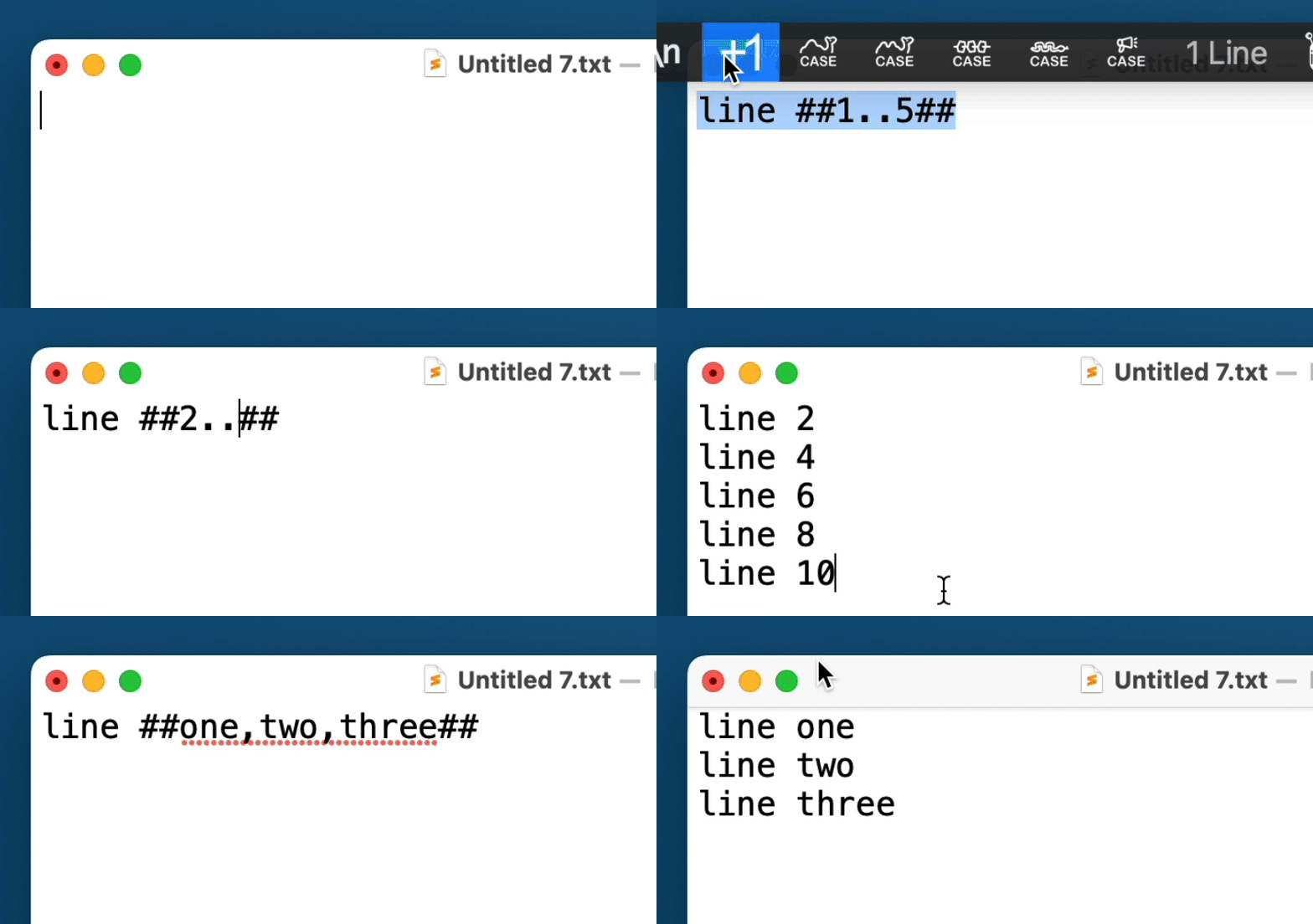
Increment Templated
PopClip extension to increment and repeat templated text.
Select and run on the following text:
This is a numeric increment ##0..2##.
Which will generate:
This is a numeric increment 0.
This is a numeric increment 1.
Specify a value to increment by with ##START..INCREMENT..END##, e.g. ##0..2..10## would insert 0, 2, 4, 6, 8, and 10.
Placeholders
You can use placeholders with basic math modification. ##x## inserts the current element again. ##i## inserts the 0-based index in the iteration. So if the template is ##5..7##, on the second iteration x would hold 6 and i would hold 1.
Apply math functions to the placeholders using basic operator symbols (including % for mod). To insert the current value times 10, use ##x*10##. More complex equations are allowed, e.g. ##(i+2)*10##. Use % for modulus.
You can include leading zeroes on math operations to pad the result. If you want to just pad the number without modifying, you would use ##x*0001##, which would turn 5 into 0005 and 50 into 0050. Including a 0 padding on any element of the equation will result in padded output.
String Arrays
You can also use arrays of strings or numbers:
Hello ##mother,father,sister,brother##. And repeat with ##x##.
Yields:
Hello mother. And repeat with mother.
Hello father. And repeat with father.
Hello sister. And repeat with sister.
Hello brother. And repeat with brother.
The ##i## placeholder (zero-based index) with math operators is also available in string array replacements. If you want the index to also refer to strings, add #list,of,strings after the index or equation, e.g. ##i%2#odd,even## to insert odd and even alternately with each iteration.
PopClip extension to lengthen and clean URLs in the selection, then paste the result.
Uses the StretchLink.cc API for expansion and tracking cleanup.
Command: copy cleaned text instead of pasting
Command-Option: copy just the cleaned URL(s)
Options
Tidy Amazon URLs: when enabled, adds StretchLink’s tidy_amazon parameter to tidy all Amazon product links.
Markdown to Mindmap
Takes a selection of plain text containing markdown headlines, list items and paragraphs and converts it into a format ready for pasting into a mind mapping application (such as MindNode, MindManager or MindMeister) as separate nodes/topics.
List indentation is normalized to tabs. Nested lists that use 2-space or 4-space indents are detected automatically; lines that are already tab-indented are left as tabs.
Markdownify
Turn HTML text into Markdown using html2text.
MDList
PopClip extension to turn lines of text into Markdown lists. Choose an action from the submenu:
-: unordered list (markers cycle *, -, + by nesting level)
1.: numbered list (renumbers existing items; converts bullets to numbers)
X: clear list markers
Indentation is handled as nested lists. Existing markers are overwritten when converting between bullet and numbered styles.
nvUltra
nvUltra extension for PopClip. Add text as new note to frontmost notebook, or define a notebook in settings.
Option: join lines first to repair URLs broken across line breaks
Outdent
Outdents the selection while keeping relative nesting.
Click to remove the shared leading indent from all lines
Command: fully strip leading whitespace from every line
PoorText
Make rich text go broke.
Strips rich text formatting from selection. There are probably multiple others that do this, but it’s so easy I just made it myself.
BulletList
PopClip extension to turn lines of text into Markdown bullet items. Indentation is handled as nested lists and existing markers are overwritten (numbered list becomes bullet list).
Numbered lists
Holding Option (⌥) while clicking the button for the extension in the PopClip bar will create/update a numbered list instead. When the list is already a numbered list, it will be re-numbered to fix any gaps or out-of-order numbering within nest levels.
Clear list formatting
Holding Command (⌘) while clicking will remove all list prefixes.
Bullet format
When you install this extension, you’ll get an options page where you can select the type of bullet you prefer for unordered lists. This can be accessed again later by clicking the pencil button at the bottom of the list, then clicking the gear button next to the BulletList extension.
Slugify
Turn selected text into a URL-friendly post slug: lowercase, hyphens for spaces, and non-alphanumeric characters removed.
Also:
Accents are folded (café → cafe)
. → -dot-, + → -plus-, & → -and-, @ → -at-
Underscores become hyphens; repeated separators collapse
Sum
Detect all numbers in selection and total them. Allows decimal places (using . or , as separator) and negative numbers. Result is copied to clipboard.
Use the options “Separator” and “Decimal Delimiter” to define characters used in your locale for separating thousands and decimal places, respectively.
Twitterify
Convert all @names and #tags to Markdown or HTML links pointing at x.com (profiles and hashtag search). You can set the default link type in the extension’s options (Markdown Links), and manually switch to the other type by holding down Option when running it.
URLEncode
Percent-encodes the selected text (encodeURIComponent).
Also known as WebMD, this extension shows up when you select text on a web page. Clicking it will convert the selected headlines, text and links (including image links) to Markdown in your clipboard.
This extension uses Gather to markdownify the selection. If you don’t have the gather CLI installed, WebMarkdown will offer to download and install it for you the first time you run it.
Allows the definition of three custom “wrappers,” prefixes and suffixes that will surround selected text. They’re triggered, respectively, by clicking with the Option key, Command key or no modifier key held down.
Think of it as a custom version of the comments plugin. I find it quite handy for adding <mark>, <ins> and <del> tags to text when editing for others.
When installing the extension, the options will appear. They can be accessed again by going into edit mode in the plugins dropdown and clicking the gear icon next to “Wrappers.”
The GitHub repository for all of my extensions is
here.
Changelog
Click to expand
1.45.5
2024-12-18 05:40
1.45.4
2024-12-18 05:38
1.45.3
2024-12-18 05:04
1.44.8
2023-02-06 11:19
1.44.7
2023-02-06 11:14
IMPROVED
Allow string arrays in template modifiers for Increment Templated
1.44.6
2023-02-06 11:01
IMPROVED
Allow string arrays in template modifiers for Increment Templated
1.44.5
2023-02-06 10:21
IMPROVED
Using extension READMEs to generate main README
Updated READMEs
Allow more complex mathematical equations with i and x in Increment Templated
1.44.4
2023-01-31 08:07
IMPROVED
Using extension READMEs to generate main README
Updated READMEs
1.44
Fix SearchLink extension
1.43
If SearchLink isn’t installed, install it when running the SearchLink extension
1.42
Fix nvUltra extension
Add SearchLink extension
1.41
Update WebMarkdown to allow for gather installs in /opt/homebrew/bin.
1.40
Remove the popcliphtml2text CLI from WebMarkdown that was causing “malicious software” warnings. Now offers to download and install using the signed and notarized package.
1.38
Fix a couple of bugs and improve output of html2text for WebMarkdown
1.35
Convert WebMarkdown to use Swift-based HTML2Text, avoiding need for Python executable
1.34
Fix for WebMarkdown, change to python3 and update html2text
1.33
Fix for bad option default type in some of the plists.
1.31
Increment Templated updates/fixes
1.28
Add “Increment Templated” extension
1.27
Add “HardWrap” extension
1.25
Replace PreviewURL with CheckURLs
Allows results from preview navigation to modify selected text
Better icon
1.24
Updated PreviewURL
Ignore URLs without http(s) protocol
Handle multiple URLs
Center preview pane on display
1.19 — 1.23
stupid commits because I’m having trouble with the build script. Don’t mind me.
1.18
Quick little format stripper (PoorText)
1.17
Added “DefineAbbr” extension
1.16
Updated (rewritten) blockquote extension
1.15
Added “Sum” extension
1.14
Added LinkCleaner and CopyCleanLinks extensions
1.12
Added Twitterify extension.
1.11
Added the WebMarkdown extension.
1.10
Updated OpenURLS
Better regex for extracting URLs
Hold down Option to combine lines and fix broken urls
This can cause issues with full urls on consecutive lines, but is handy for a single broken link.
Leaves leading space on lines, so urls broken with an indent are still screwed. Ran into too many problems trying to parse around that.
Added CopyURLs
Duplicate of OpenURLs, but copies a plain, newline-separated list to the clipboard
Added FixPoorlyObscuredEmails
Fixes “me AT here DOT com” style email obfuscations
Hold Option to compose new email for matched addresses
1.8
Blockquote:
Handle line breaks better
Command-click to decrease quote level
Command-Option-click key to remove all quoting
don’t quote reference link definitions
BulletList: Bullet type configuration options, Command modifier to remove list formatting
CopyPlus: Option modifier to concatenate strings with no extra whitespace
Credits block for all extensions
URLEncode extension (also available at Pilot Moon)
1.7
Outdent: Command-click to outdent all lines fully
Too Many Wrappers: Removed Shift-click options as they were breaking stuff.
CopyPlus: Command-click to add extra linebreak between entries